취약점 분석

잘 보면 명령창이 나온다.
아무 명령어나 쳐보면 다음과 같이 나온다.
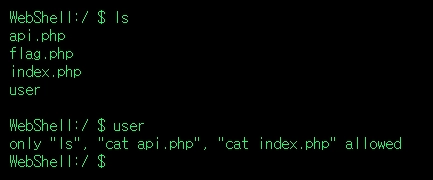
ls를 치면 현재 디렉토리의 파일 목록이 보이고, 다른 명령어를 쳤더니 ls, cat api.php, cat index.php 이외의 명령어를 칠 수 없게 막아놨다고 되어있다.
일단 cat index.php를 입력했다.
<style>
@import url('https://fonts.googleapis.com/css?family=Inconsolata');
body {
  background-color:black;
  color: #18ff62;
  font-family:"Inconsolata","Courier New";
  vertical-align:middle;
  font-size:13px;
}
pre {
  margin-bottom:0px;
  position:relative;
}
#inputline {
  margin-top:0px;
}
.console-container {
  margin-left:8px;
}
input {
  background-color:transparent;
  border:none;
}
#caret {
  animation:caret .75s step-end infinite;
  position:relative;
  user-select:none;
}
#input, #prompt {
  display:inline-block;
  float:left
}
@keyframes caret {
  from, to { color: transparent }
  50% { color: #18ff62; }
}
</style>
<div class="console-container">
  <pre id="console-text"></pre>
  <pre id="inputline"><div id="prompt">WebShell:/ $ </div><div id="input"></div><div id="caret">▓</div></pre>
</div>
<script>
var terminal = document.getElementById("console-text");
var inputline = document.getElementById("inputline");
var input = document.getElementById("input");
var prompt = "WebShell:/ $ "
var cursorpos = 0
function printLine(text) {
  terminal.innerText += text + "\n";
}
function printNewLine() {
  terminal.innerText += "\n";
}
function appendLine(text) {
  terminal.innerText += text
}
function clearConsole() {
  terminal.innerText = "";
}
function backspace() {
  if (input.innerText != "" && cursorpos != 0) {
    let text = input.innerText;
    input.innerText = text.slice(0, cursorpos-1) + text.slice(cursorpos);
    cursorpos--;
  }
}
function hidePrompt() {
  inputline.style.display = "hidden"
}
function showPrompt() {
  inputline.style.display = "initial"
}
function type(text) {
  input.innerText += text;
  cursorpos++
  // moveCaret("right")
}
function moveCaret(dir) {
  let charsize = input.offsetWidth/input.innerText.length
  if (dir == "right" && cursorpos != input.innerText.length) {
      caret.style.left = `-${(input.innerText.length - cursorpos-1)*charsize}px`
      cursorpos++;
  }
  else if (dir == "left" && cursorpos != 0) {
    caret.style.left = `-${(input.innerText.length - cursorpos+1)*charsize}px`
    cursorpos--;
  }
}
function submit() {
  hidePrompt();
  let wholetext = prompt + input.innerText
  let text_ = input.innerText
  input.innerText = "";
  printLine(wholetext);
  if (text_ == "clear") {
    clearConsole();
  }
  else {
    fetch("/api.php?q="+escape(text_))
    .then(response => response.text())
    .then(text_ => printLine(text_));
    // printLine(`Unknown Command: "${text}"`)
  }
  showPrompt();
}


document.addEventListener("keydown", (e)=>{
  if (inputline.style.display == "hidden") return;
  if (["Shift","CapsLock","Control","Alt","Meta","Escape","Dead"].includes(e.key) || e.key.match(/F\d+/)) return;
  if (e.key.match(/Arrow.+/)) {
    if (e.key == "ArrowRight") {
      moveCaret("right")
    }
    if (e.key == "ArrowLeft") {
      moveCaret("left")
    }
    return;
  }
  switch (e.key) {
    case "Enter":
      submit();
      break;
    case "Backspace":
      backspace();
      break;
    default:
      type(e.key)
  }
})
document.body.focus()
printLine("WebShell [Version 1.0.00000.001]");
//printLine("(c) 2018 AlpacaFur. All rights reserved.");
printNewLine();
</script>
프론트엔드 코드로 별다른 취약점이 없다.
그래서 api.php 코드를 보았다.
WebShell:/ $ cat api.php소스코드 분석
<?php
  // system($_GET['q']);
  if(!preg_match('/^[a-f0-9]+$/',$_COOKIE['baby_toctou'])){ $newCookie = uniqid().rand(1,999999999); setcookie("baby_toctou",$newCookie); $_COOKIE['baby_toctou'] = $newCookie; }
  $cmd = $_GET['q'];
  $myfile = fopen("user/{$_COOKIE['baby_toctou']}.sh", "w") or die("Unable to open file!");
  fwrite($myfile, $cmd);
  fclose($myfile);
  if(($cmd === "ls") || ($cmd === "cat api.php") || ($cmd === "cat index.php")){ // valid check
    sleep(1); // my server is small and weak
    system("sh ./user/{$_COOKIE['baby_toctou']}.sh");
  }
  else{
    echo <<<HELP
only "ls", "cat api.php", "cat index.php" allowed
HELP;
  }
?>- 명령어를 치고, 입력한 직전의 명령어를 $_COOKIE['baby_toctou'].sh 파일에 저장한다.
- 그리고 명령어는 q라는 파라미터로 받아 $cmd라는 변수에 담는데, 명령어를 아래 나오는 부분에서 필터링한다.
if(($cmd === "ls") || ($cmd === "cat api.php") || ($cmd === "cat index.php")){ // valid check
    sleep(1); // my server is small and weak
    system("sh ./user/{$_COOKIE['baby_toctou']}.sh");
}- sleep(1); 옆에 주석을 보면, my server is small and weak을 이라고 쓰여있다.
- 명령어를 입력하면, 1초 동안 PHP 코드 실행을 정지 시키고, 그 후 ./user/{$_COOKIE['baby_toctou']}.sh에 저장된 명령어를 입력한다.
순서를 정리하자면,
- 명령어를 q라는 파라미터로 받아서 $cmd라는 변수로 입력 받음
- 명령어를 실행하기 전에 먼저 ./user/{$_COOKIE['baby_toctou']}.sh파일에 저장
- 1초 동안 코드실행 정지
- if조건 내에서 명령어 필터링 실행
- sleep함수로 1초동안 코드를 정지한 후, ./user/{$_COOKIE['baby_toctou']}.sh 파일에 저장된 명령 실행
여기서 취약점은, 서버의 부담을 낮추기 위해, sleep함수로 1초동안 코드를 정지하고 나서 명령어를 실행한다는 것이다.
sleep함수 : 입력된 초만큼 해당 PHP 스크립트의 실행을 지연시키는 역활을 하는 함수
때문에 0.000001 초단위로 실행시간을 조정할 수 있습니다.
익스플로잇
sleep함수로 PHP 실행을 멈춘다면, 그 동안은 PHP 스크립트 실행이 멈춘다는 것이다.
이 순간을 노려, cat flag.php를 빠르게 실행하면 플래그를 볼 수 있다.
브라우저를 두개 띄운다.

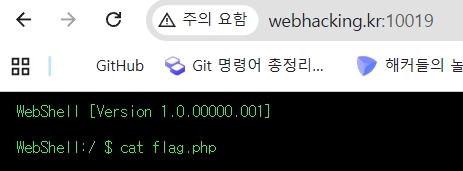
그리고 왼쪽에 ls를 입력하고 빠르게 1초안에 오른쪽 창에서 cat flag.php를 실행한다.
미리 입력 해놓고 엔터만 누르는 것이다.

익스플로잇 흐름
- 먼저 왼쪽 브라우저에서 ls 명령어를 실행한다.
- 그러면, ./user/{$_COOKIE['baby_toctou']}.sh 파일 내용은 ls다.
- 그 상황에서, 1초 동안 sleep()함수로 PHP 스크립트를 정지한다.
- 그런데, 오른쪽 브라우저에서는 여전히 PHP 스크립트가 돌아가고있다.
- 여기서 cat flag.php로 코드를 입력한다.
- 그러면, ./user/{$_COOKIE['baby_toctou']}.sh 파일 내용이 cat flag.php가 된다.
- 왼쪽 브라우저에서 실행되는 중인 PHP 스크립트의 입장에서는, 1초 동안 실행을 정지한 상태에서 ./user/{$_COOKIE['baby_toctou']}.sh 파일 내용이 cat flag.php로 바뀐 상황이다.
- 그렇기 때문에 system("sh ./user/{$_COOKIE['baby_toctou']}.sh"); 코드에서는 결국 cat flag.php이 실행되는 것이다.
'Webhacking.kr' 카테고리의 다른 글
| old-50 (0) | 2026.05.13 |
|---|---|
| old-43 RevengE (0) | 2026.05.13 |
| old-28 (1) | 2026.05.12 |
| old-30 (0) | 2026.05.12 |
| old-40 (0) | 2026.05.12 |


